QUICKSURFACE for SOLIDWORKS is a reverse engineering add-in for SOLIDWORKS Desktop 3D CAD that lets you convert 3D scan meshes into CAD models It provides efficient tools to generate surfaces and curves to help reconstructing a professional CAD model
Summary
Summary
Advantage
Advantage
Save more than 50% on time and efforts over any other approach of doing reverse engineering in SOLIDWORKS® Desktop 3D CAD by using the QUICKSURFACE add-in.
QUICKSURFACE allows the user to

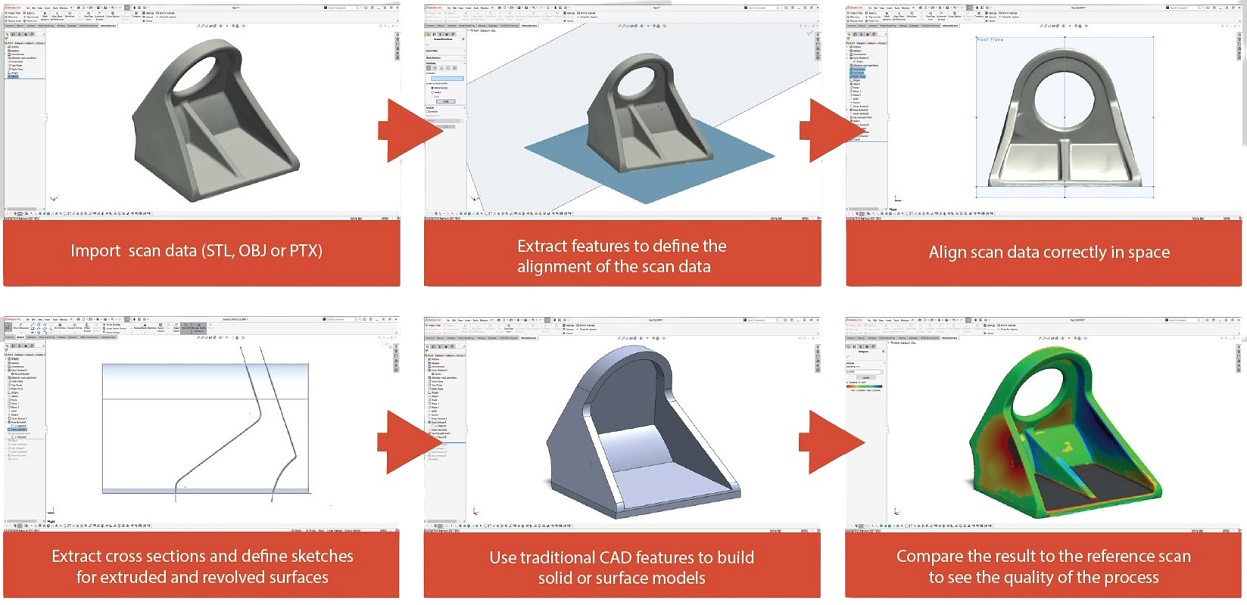
Fast Scan Import: Quickly import large scan data into SOLIDWORKS.
Reference Geometry Extraction: Extract geometries like symmetry planes.
Intuitive Alignment: Align scans with CAD models or multiple scans easily.
Cross-section Creation: Create reference cross-sections for sketching.
Precise Shape Fitting: Accurately fit line arcs and complex shapes to points.
Freeform Surface Approximation: Best-fit freeform surface approximation.
Accurate Reverse Engineering: Precisely reverse-engineer organic and freeform shapes.
3D Color Map Comparison: Instantly compare CAD models with reference data.
One-click Shape Conversion: Convert organic shapes to CAD models with one click.
Reverse engineering workflow
1. Developed by experts in 3D Scanning and data processing.
2. Fast and efficient algorithms.
3. Simplified interface for ease of use.
4. Extensive learning tutorials.
5. State of the art features.
6. Reduce drastically the reverse engineering time thus saving money and efforts;